Every time you browse a website, stream a video, or send an email, network protocols work behind the scenes to deliver data packets from your computer to remote servers. Two protocols dominate this traffic: TCP (Transmission Control Protocol) and UDP (User Datagram Protocol). Understanding the difference between these protocols is fundamental to networking, troubleshooting connectivity issues, and optimizing application performance.
This guide breaks down how TCP and UDP work, when each protocol is used, and how to observe these connections on your own computer using built-in networking tools.
Reading Time: 10 minutes
What You’ll Learn:
- How TCP guarantees packet delivery with connection-oriented sessions
- Why UDP uses connectionless sessions without delivery guarantees
- Real-world applications that use TCP vs UDP
- How to view active TCP and UDP connections using netstat
- Common ports and protocols (HTTP, FTP, POP3)
- When to use TCP vs UDP for different networking scenarios
Prerequisites: Basic understanding of networking concepts and IP addresses. Familiarity with command-line interfaces helpful but not required.
What is TCP (Transmission Control Protocol)?
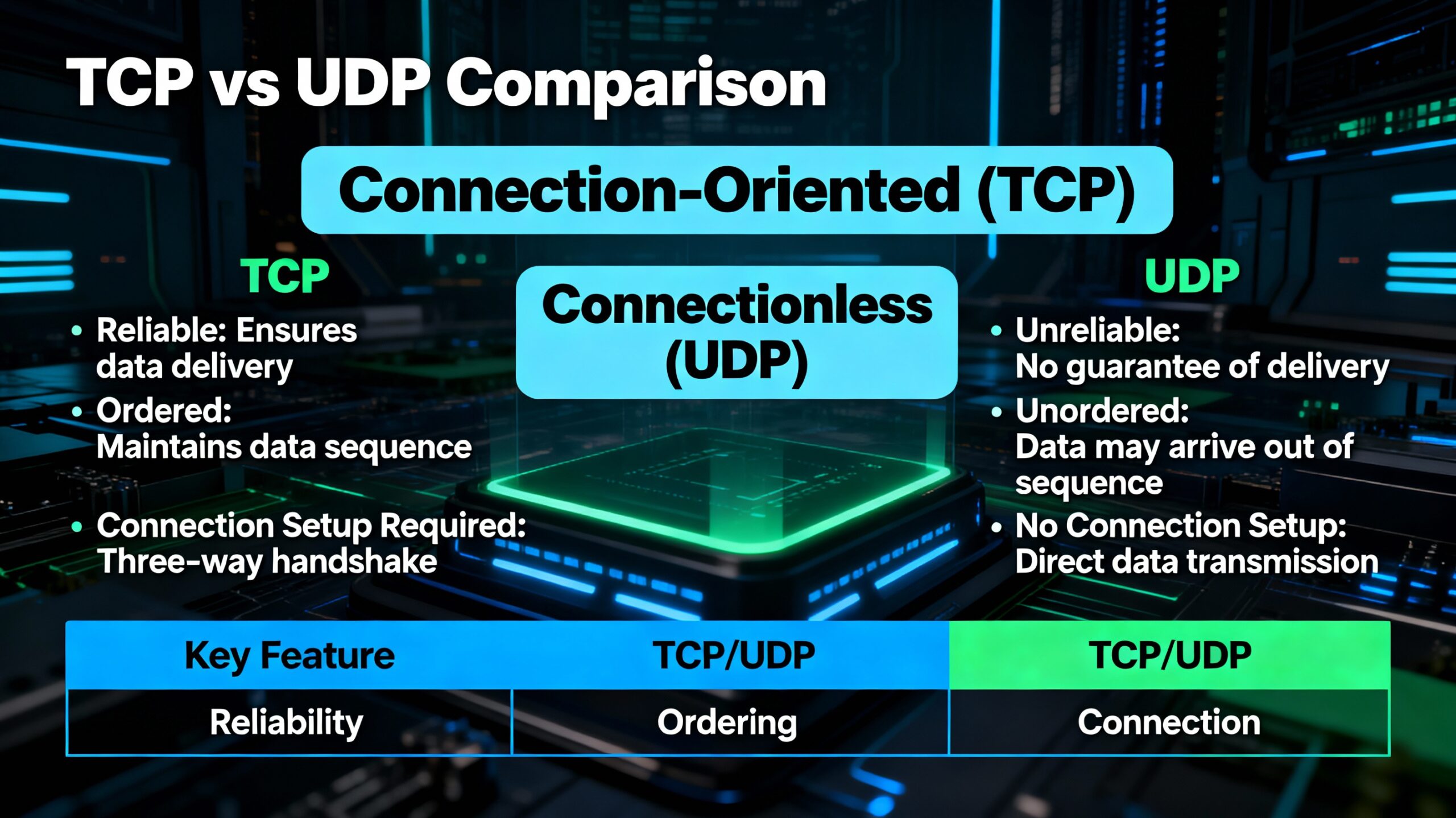
TCP (Transmission Control Protocol) is the most commonly used transport layer protocol, governing connection-oriented sessions that guarantee data transmission from one point to another. TCP ensures every IP packet from a message reaches its destination in the correct order.
How TCP Works
When you send a message (email, web request, file transfer) from one computer to another, here’s what happens with TCP:
- Message breakdown: The original message is divided into multiple IP packets
- Packet identification: Each packet receives a unique sequence ID number
- Transmission: Packets are sent across the network to the destination
- Reception and reassembly: The receiving computer:
- Collects all incoming packets
- Re-sequences them according to ID numbers
- Checks for missing packets
- Requests retransmission of any missing packets
- Acknowledgment: Only when all packets arrive does the receiving computer acknowledge successful delivery and reassemble the original message
Key characteristic: TCP guarantees that no packet is left behind. If any packet goes missing during transmission, the receiving computer requests retransmission until all packets arrive successfully.
The TCP/IP Protocol Suite
TCP and IP (Internet Protocol) work so closely together that we refer to the entire networking stack as TCP/IP. Here’s the layered structure:
Layer 1 – Network Layer:
- IP addresses identify computers
- IP protocol routes packets between networks
- Creates sessions between computers
Layer 2 – Transport Layer:
- TCP runs on top of IP
- Governs the entire session
- Ensures reliable packet delivery
- Manages packet sequencing and error checking
Layer 3 – Application Layer:
- Application-specific protocols (HTTP, FTP, POP3, SMTP)
- Uses TCP for reliable data transfer
- Provides services to end-user applications
💡 Key Concept: TCP “encapsulates” IP packets, wrapping them with additional information for reliability. Application protocols like HTTP then rely on TCP’s guaranteed delivery to function correctly.
Common TCP Protocols and Ports
TCP is used by protocols that require reliable, ordered data delivery:
| Protocol | Port | Purpose | TCP/UDP |
|---|---|---|---|
| HTTP | 80 | Web browsing | TCP (primary), UDP (optional) |
| HTTPS | 443 | Secure web browsing | TCP |
| FTP | 21 | File transfer | TCP (primary), UDP (optional) |
| POP3 | 110 | Email retrieval | TCP |
| SMTP | 25 | Email sending | TCP |
| SSH | 22 | Secure remote access | TCP |
| Telnet | 23 | Remote terminal access | TCP |
Viewing TCP Connections in Real-Time
You can observe active TCP connections on your computer using the netstat command:
Windows/Linux/macOS:
netstat -n
Expected output:
Proto  Local Address          Foreign Address        State
TCP    192.168.1.100:54892    216.97.236.245:80     ESTABLISHED
TCP    192.168.1.100:54893    172.217.14.206:443    ESTABLISHED
TCP    192.168.1.100:54894    13.107.42.14:443      ESTABLISHED
Understanding the output:
- Proto: Protocol type (TCP or UDP)
- Local Address: Your computer’s IP address and outbound port
- Example:
192.168.1.100:54892(IP address .100, using port 54892)
- Example:
- Foreign Address: Remote server’s IP address and service port
- Example:
216.97.236.245:80(server IP, port 80 = HTTP)
- Example:
- State: Connection status (ESTABLISHED, LISTENING, TIME_WAIT, etc.)
Real-World Example: Web Browsing with TCP
When you visit a website, TCP ensures reliable delivery:
Scenario: Browsing to davidlprouse.com
- DNS lookup: Resolve domain name to IP addresstext
nslookup davidlprouse.comOutput:textName: davidlprouse.com Address: 216.97.236.245 - TCP connection established: Your browser initiates TCP handshake to port 80 (HTTP)
- View the connection:text
netstat -n | findstr 216.97.236.245Output:textTCP 192.168.1.100:54892 216.97.236.245:80 ESTABLISHED - Data transfer:
- Browser requests web page (HTTP GET request broken into TCP packets)
- Server responds with HTML, CSS, JavaScript (broken into TCP packets)
- TCP ensures every packet arrives in order
- Browser assembles complete web page and renders it
- Connection closure: TCP gracefully closes connection when transfer completes
Why TCP matters here: If even one packet containing critical CSS styling is lost, the web page displays incorrectly. TCP prevents this by guaranteeing delivery of every packet.
What is UDP (User Datagram Protocol)?
UDP (User Datagram Protocol) is a transport layer protocol that uses connectionless sessions for non-guaranteed data transmission. Unlike TCP, UDP does not verify packet delivery—if packets are lost, they are not retransmitted.
How UDP Works
UDP operates with a “fire and forget” mentality:
- Message breakdown: Data is divided into datagrams (UDP’s term for packets)
- Transmission: Datagrams are sent to the destination
- No acknowledgment: Receiving computer does not confirm receipt
- No retransmission: Lost packets are never requested again
- No sequencing guarantee: Packets may arrive out of order
Key characteristic: UDP prioritizes speed over reliability. By eliminating acknowledgments, error checking, and retransmissions, UDP reduces latency and overhead significantly.
When UDP is Preferred
Despite lacking delivery guarantees, UDP is ideal for specific scenarios:
1. Real-time streaming media
Applications: Video streaming (YouTube, Netflix), audio streaming (Spotify, internet radio), video conferencing (Zoom, Teams)
Why UDP works:
- Missing a few packets causes brief glitches (dropped frames, audio blips)
- Retransmitting old packets is useless—by the time they arrive, playback has moved on
- Low latency is more important than perfect accuracy
- Human perception tolerates minor data loss
2. BitTorrent and peer-to-peer file sharing
Why UDP works:
- Downloads occur from multiple sources simultaneously
- File integrity checked after download completes using checksums
- Missing pieces are re-downloaded from different peers
- Speed advantage outweighs occasional packet loss
3. VPN tunneling protocols
Applications: OpenVPN, WireGuard, IPSec
Why UDP works:
- Lower overhead means faster VPN connections
- Application-layer protocols handle their own reliability if needed
- Reduces latency for real-time applications over VPN
4. DNS (Domain Name System) queries
Why UDP works:
- Queries are small (single packet)
- If no response, client simply retries
- Faster than establishing TCP connection for tiny requests
5. Online gaming
Why UDP works:
- Real-time position updates need low latency
- Old position data is useless if delayed
- Game clients interpolate missing updates
- Players prefer responsiveness over perfect accuracy
Viewing UDP Connections
View both TCP and UDP connections simultaneously:
netstat -an
Expected output:
Proto  Local Address          Foreign Address        State
TCP    192.168.1.100:54892    216.97.236.245:80     ESTABLISHED
TCP    192.168.1.100:54893    172.217.14.206:443    ESTABLISHED
UDP    192.168.1.100:5353     *:*
UDP    192.168.1.100:54321    *:*
Understanding UDP output:
- Foreign Address shows
*:*when no specific destination (listening for incoming packets) - UDP has no “State” column because it’s connectionless—no established sessions to track
- UDP sockets typically listen for incoming datagrams rather than maintaining persistent connections
Common UDP Protocols and Ports
| Protocol | Port | Purpose | Characteristics |
|---|---|---|---|
| DNS | 53 | Domain name resolution | Small queries, retry on timeout |
| DHCP | 67/68 | IP address assignment | Local network, minimal overhead |
| SNMP | 161/162 | Network monitoring | Polling, some data loss acceptable |
| TFTP | 69 | Trivial file transfer | Simple, lightweight |
| NTP | 123 | Time synchronization | Periodic updates, speed over accuracy |
| VoIP/SIP | 5060/5061 | Voice over IP | Real-time audio, low latency critical |
TCP vs UDP: Direct Comparison
| Feature | TCP | UDP |
|---|---|---|
| Connection type | Connection-oriented | Connectionless |
| Reliability | Guaranteed delivery | No delivery guarantee |
| Packet ordering | Sequenced and ordered | May arrive out of order |
| Error checking | Extensive | Minimal (checksum only) |
| Retransmission | Automatic for lost packets | No retransmission |
| Speed | Slower (overhead from reliability) | Faster (minimal overhead) |
| Header size | 20-60 bytes | 8 bytes |
| Use cases | Web browsing, email, file transfer | Streaming, gaming, VoIP, DNS |
| Acknowledgment | Required for each packet | None |
| Flow control | Yes (prevents overwhelming receiver) | No |
| Congestion control | Yes (adapts to network conditions) | No |
When to Use TCP
Choose TCP when:
- Data accuracy is critical (financial transactions, file downloads, database queries)
- Complete data delivery is required (emails, web pages, API requests)
- Order matters (sequential data, text documents, configuration files)
- You can tolerate slightly higher latency for reliability
Example applications:
- HTTP/HTTPS web browsing
- Email (SMTP, POP3, IMAP)
- File transfer (FTP, SFTP, SCP)
- Remote access (SSH, RDP)
- Database connections (MySQL, PostgreSQL, SQL Server)
When to Use UDP
Choose UDP when:
- Speed is more important than accuracy (real-time communications)
- Some packet loss is acceptable (streaming media, gaming)
- Low latency is critical (VoIP, video conferencing)
- Requests are small and idempotent (DNS queries—safe to retry)
- Application handles its own reliability (BitTorrent, custom protocols)
Example applications:
- Video streaming (Netflix, YouTube)
- Online gaming (multiplayer games)
- Voice over IP (Zoom, Skype, Teams)
- DNS queries
- Network monitoring (SNMP)
- IoT sensor data (periodic updates)
🎯 Rule of Thumb: If losing a packet means failure, use TCP. If losing a packet means a brief glitch you can tolerate, consider UDP.
Finding Port Numbers: IANA Registry
The Internet Assigned Numbers Authority (IANA) maintains the official registry of port numbers and their associated protocols.
Accessing the IANA Port Registry
Direct link: https://www.iana.org/assignments/service-names-port-numbers/service-names-port-numbers.xhtml
Quick search: Google “IANA port listing” or “port number registry”
Using the Registry
Search by port number:
Looking up port 80:
- Service Name: http
- Port Number: 80
- Transport Protocol: TCP (primary), UDP (optional)
- Description: World Wide Web HTTP
Search by service name:
Looking up HTTP:
- Shows all HTTP-related ports (80, 8080, 8443, etc.)
- Transport protocols supported (usually TCP, sometimes UDP)
- Assigned authority and registration date
Important Ports to Memorize
For certification exams and daily work, know these common ports:
| Port | Protocol | Service | Note |
|---|---|---|---|
| 20/21 | FTP | File Transfer | 21 = control, 20 = data |
| 22 | SSH | Secure Shell | Encrypted remote access |
| 23 | Telnet | Remote terminal | Insecure, avoid in production |
| 25 | SMTP | Email sending | Mail transfer agent |
| 53 | DNS | Name resolution | Usually UDP, TCP for zone transfers |
| 67/68 | DHCP | IP assignment | 67 = server, 68 = client |
| 80 | HTTP | Web browsing | Unencrypted |
| 110 | POP3 | Email retrieval | Download and delete |
| 143 | IMAP | Email access | Keep emails on server |
| 443 | HTTPS | Secure web | Encrypted HTTP |
| 3389 | RDP | Remote Desktop | Windows remote access |
📚 Exam Tip: Know whether common protocols use TCP or UDP by default. HTTP (80), HTTPS (443), FTP (21), and SMTP (25) primarily use TCP. DNS (53) uses both but prefers UDP for queries.
Practical Commands for Network Analysis
Netstat Command Options
Basic syntax:
netstat [options]
Common options:
View all connections (TCP and UDP):
netstat -a
Numeric format (IP addresses instead of hostnames):
netstat -n
Combined (all connections, numeric):
netstat -an
Show listening ports:
netstat -l    # Linux/macOS
netstat -a    # Windows (includes listening)
Show process IDs (requires admin/root):
netstat -o     # Windows
netstat -p     # Linux/macOS
Continuous monitoring (refresh every 2 seconds):
netstat -an 2
Filtering Netstat Output
Windows (using findstr):
# Show only connections to specific IP
netstat -an | findstr 216.97.236.245

# Show only HTTP connections (port 80)
netstat -an | findstr :80

# Show only ESTABLISHED connections
netstat -an | findstr ESTABLISHED
Linux/macOS (using grep):
# Show only TCP connections
netstat -an | grep tcp

# Show only listening UDP ports
netstat -an | grep udp | grep LISTEN

# Show connections to specific port
netstat -an | grep :443
NSLookup for DNS Resolution
Basic domain lookup:
nslookup example.com
Expected output:
Server:  dns.google
Address:  8.8.8.8

Non-authoritative answer:
Name:    example.com
Address:  93.184.216.34
Reverse lookup (IP to hostname):
nslookup 93.184.216.34
Query specific DNS server:
nslookup example.com 8.8.8.8
Troubleshooting with TCP vs UDP Knowledge
Understanding TCP and UDP helps diagnose network issues:
Scenario 1: Website Loads Slowly
Symptoms: Web pages take long to load, images appear gradually
Likely cause: TCP retransmissions due to packet loss
Diagnosis:
netstat -s | findstr "Retransmit"    # Windows
netstat -s | grep retrans             # Linux/macOS
High retransmission counts indicate:
- Network congestion
- Faulty network equipment
- Wireless interference
- ISP issues
Scenario 2: Video Streaming Stutters
Symptoms: Video pauses, buffers frequently, pixelation
Likely cause: Insufficient bandwidth or packet loss (UDP can’t retransmit)
Why UDP matters: Streaming uses UDP for speed, but severe packet loss causes noticeable quality degradation
Diagnosis:
- Test bandwidth: speedtest.net
- Check packet loss:
ping -t google.com(look for dropped packets) - Monitor network usage: Task Manager → Performance → Network
Scenario 3: Online Game Lag
Symptoms: Actions delayed, rubber-banding, disconnections
Likely cause: High latency or packet loss affecting UDP game traffic
Why UDP matters: Games prioritize low latency over perfect accuracy, but excessive packet loss breaks gameplay
Diagnosis:
# Test latency to game server
ping game-server.com

# Continuous monitoring
ping -t game-server.com
Look for:
- Average latency (good: <50ms, acceptable: <100ms, poor: >150ms)
- Packet loss (good: 0%, acceptable: <1%, poor: >2%)
Key Takeaways
🔒 TCP guarantees reliable delivery through connection-oriented sessions that acknowledge every packet, retransmit lost data, and maintain correct sequencing—essential for applications where accuracy matters more than speed.
⚡ UDP prioritizes speed over reliability with connectionless sessions that eliminate acknowledgment overhead, making it ideal for real-time applications like streaming and gaming where occasional packet loss is tolerable.
🌐 The TCP/IP protocol suite layers these protocols—IP handles routing, TCP/UDP manage transport reliability, and application protocols like HTTP and DNS provide services—understanding this stack is fundamental to networking.
🔧 Network troubleshooting becomes easier when you understand which applications use TCP vs UDP, allowing you to diagnose issues based on whether problems stem from reliability (TCP) or latency (UDP) concerns.
Frequently Asked Questions
Q: Can an application use both TCP and UDP?
A: Yes. DNS commonly uses UDP for queries (faster) but falls back to TCP for large responses or zone transfers. HTTP/2 and HTTP/3 (QUIC) also use UDP for improved performance while implementing reliability at the application layer.
Q: Is UDP always faster than TCP?
A: In terms of raw throughput and latency, yes—UDP has less overhead. However, if packet loss occurs, TCP’s retransmission actually delivers complete data faster than UDP applications implementing their own retry logic.
Q: Why do some protocols list both TCP and UDP in port registries?
A: Flexibility. HTTP port 80 primarily uses TCP but can optionally use UDP for specific implementations like HTTP/3. This allows protocol designers to choose the appropriate transport based on requirements.
Q: Can I force an application to use UDP instead of TCP?
A: No. The choice of TCP vs UDP is built into the application’s protocol design. You cannot change this without modifying the application itself or using a completely different protocol.
Q: What happens if I block TCP or UDP in my firewall?
A: Blocking TCP breaks web browsing, email, file transfers, and most internet services. Blocking UDP breaks DNS resolution, video streaming, online gaming, and VoIP. Both are essential for normal internet functionality.
Q: Does VPN traffic use TCP or UDP?
A: Depends on the VPN protocol. OpenVPN can use either (UDP preferred for speed), WireGuard uses UDP, IPSec uses both, and SSTP uses TCP. Most modern VPNs prefer UDP for better performance.
Next Steps: Expanding Your Networking Knowledge
Understanding TCP and UDP forms the foundation for advanced networking topics.
Recommended learning path:
Week 1-2: Protocol deep dive
- Study the three-way TCP handshake
- Learn TCP window sizing and flow control
- Explore UDP header structure
- Practice packet capture with Wireshark
Week 3-4: Application protocols
- Master HTTP/HTTPS communication
- Understand DNS query mechanics
- Explore email protocols (SMTP, POP3, IMAP)
- Study FTP active vs passive modes
Week 5-6: Troubleshooting
- Analyze packet captures for TCP issues
- Diagnose UDP packet loss
- Monitor network performance
- Implement quality of service (QoS) for UDP traffic
Certifications covering these topics:
- CompTIA Network+ (comprehensive networking)
- Cisco CCNA (routing, switching, protocols)
- CompTIA Security+ (network security, protocols)
- Wireshark Certified Network Analyst (protocol analysis)
Related Topics:
- “Understanding the OSI Model: Layers Explained with Examples”
- “Introduction to Subnetting: CIDR and IP Address Planning”
- “Network Troubleshooting: Using Ping, Traceroute, and Netstat”
- “Wireshark Basics: Capturing and Analyzing Network Traffic”
Have questions about TCP, UDP, or seeing unexpected connections in netstat? Drop a comment below with your specific scenario—I respond to every question and love helping others understand networking fundamentals.
Network protocols are the invisible infrastructure powering every internet interaction. Master TCP and UDP, and you’ll understand how data flows through networks, why applications behave differently, and how to diagnose connectivity issues effectively. Share this guide with others learning networking, and follow along for more protocol deep dives!